Build notesAI & side projects
Spotter, a gym tracker for two.
My friend and I wanted a better way to track our lifts and runs. I talked to my computer instead of shopping for an app, and 35 minutes later we had one. What Spotter does, how it plans each session, and what it took.

Spotter The gym tracker for two. Invite only.
It's still hard to get my head around it: building an app can now be cheaper and easier than finding one.
My friend and I wanted a better way to track our lifts and runs. One of us is on an iPhone, the other's on Android. Normally that means comparing apps, reading reviews, downloading a couple and settling for one that's close enough on both. I've done this before and I gave up. This time I talked to my computer instead, and we ended up with Spotter, built around exactly how we train.
This is what it does, how it plans each session, and what it took.
What we wanted
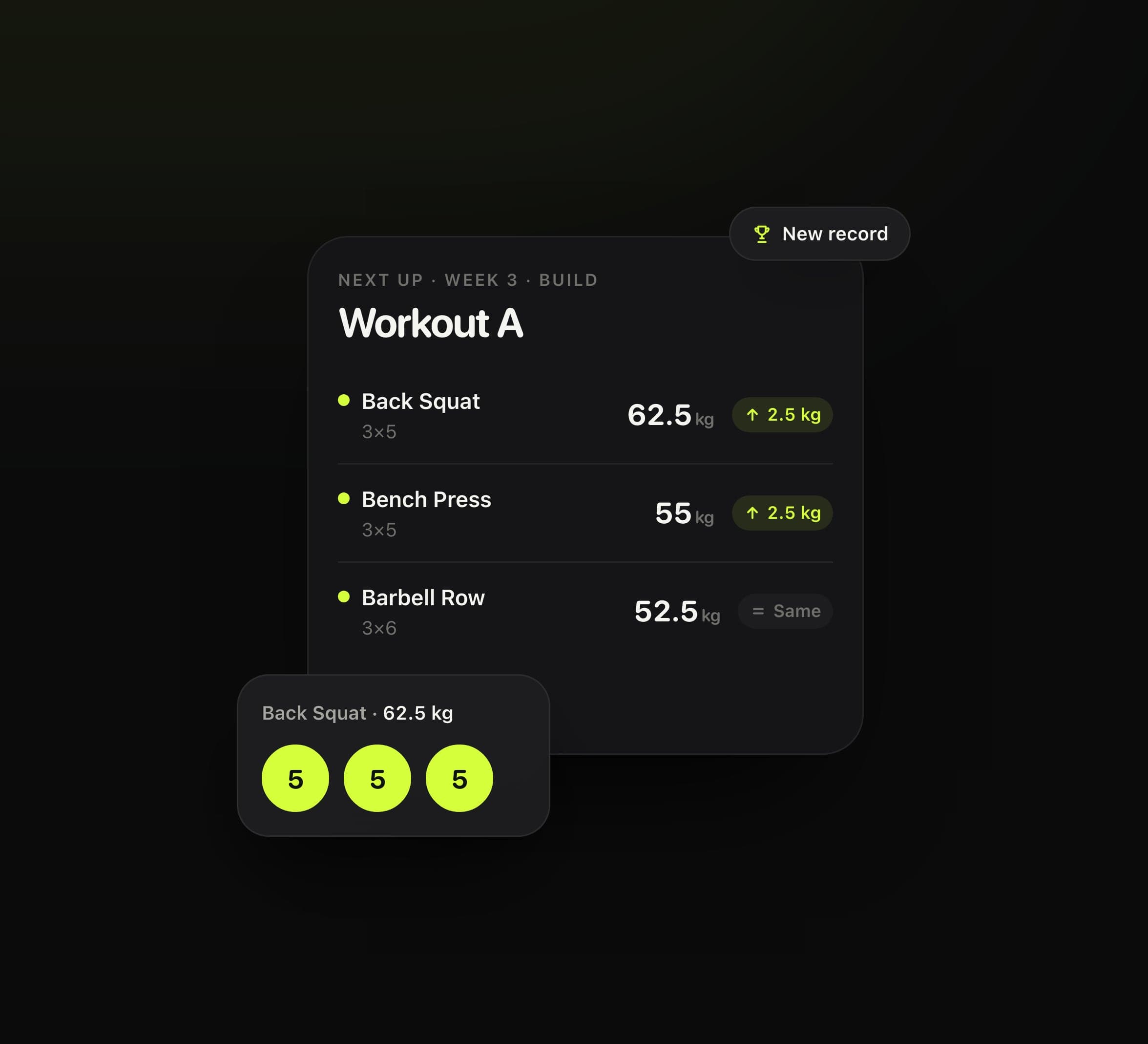
We go to the gym twice a week, on whatever days suit. We alternate between two sessions, each a couple of big compound lifts followed by a few smaller exercises. The main lifts are three sets of five, and when we hit every rep, the weight goes up by about 5%.
Most gym apps want you to set all of that up yourself, then type in every set. I wanted the opposite. Here's some of my first message, which I dictated:
…
It should be super simple. The goal is an app we barely use: at the gym, we check what's next, confirm you did it, and the next session's worked out automatically.
This is a completely independent app, it doesn't have to make money. It's just for me and my friend, so you can skip the nonsense that comes with commercial apps and prioritise the user experience. It only has to be the best app for the job.
…
The first evening
I sent that at 21:25 on Tuesday 27 October, with the plan we'd been following attached. Then I read out what we'd lifted that night. All of it was in conversation with Claude Opus 5.5, in T3 Code.
- 22:00: Spotter was live on a Vercel address, with that night's session logged and the next ones planned.
- 22:14: it had a login: a crew code the two of us share. Its first bug was fixed too. Progress and Plan had opened to a black screen in Chrome, which testing in Safari had missed.
- 22:37: the code went into a private GitHub repo, so every change after that went live by itself. Until then, the only copy was on my laptop.
- 22:40: spotterlifts.app was bought and connected, from the chat. It was $9.99 for the first year. It's the first time I've bought anything from a chat.
- By 23:32: it also had optional warm-ups, notes, a home-screen icon, a landing page, a full-screen countdown for planks, a rest timer that's off unless you want it, a separate weight jump for each lift, and a picture for when the link's shared.
From the first message to a repo, a live app and a domain, I never left T3 Code.
How it plans a session
Each set is one tap. Finish a set, tap it. If you came up short, tap again to take a rep off. After the last set, say how many reps you had left in the tank: 0–1, 2–3, or 4 or more. That's all Spotter asks.
From that, it works out next time's weight for each main lift:
- Every rep: up one jump. By default that's 5%, rounded to plates you can actually load.
- Every rep, with 4 or more left: up two jumps.
- Every rep, but a grind: the same weight, until it moves well.
- Reps missed: the same weight again, to finish the job. Stuck twice at the same weight, it drops 10% and builds back past it.
- More than three weeks off: it eases you back in at 90%.
Each lift can have its own jump, because 5% on a bench press isn't the same as 5% on a squat. When one jump would be more than 10% of the weight, as it often is with dumbbells, it adds reps first and the weight after.
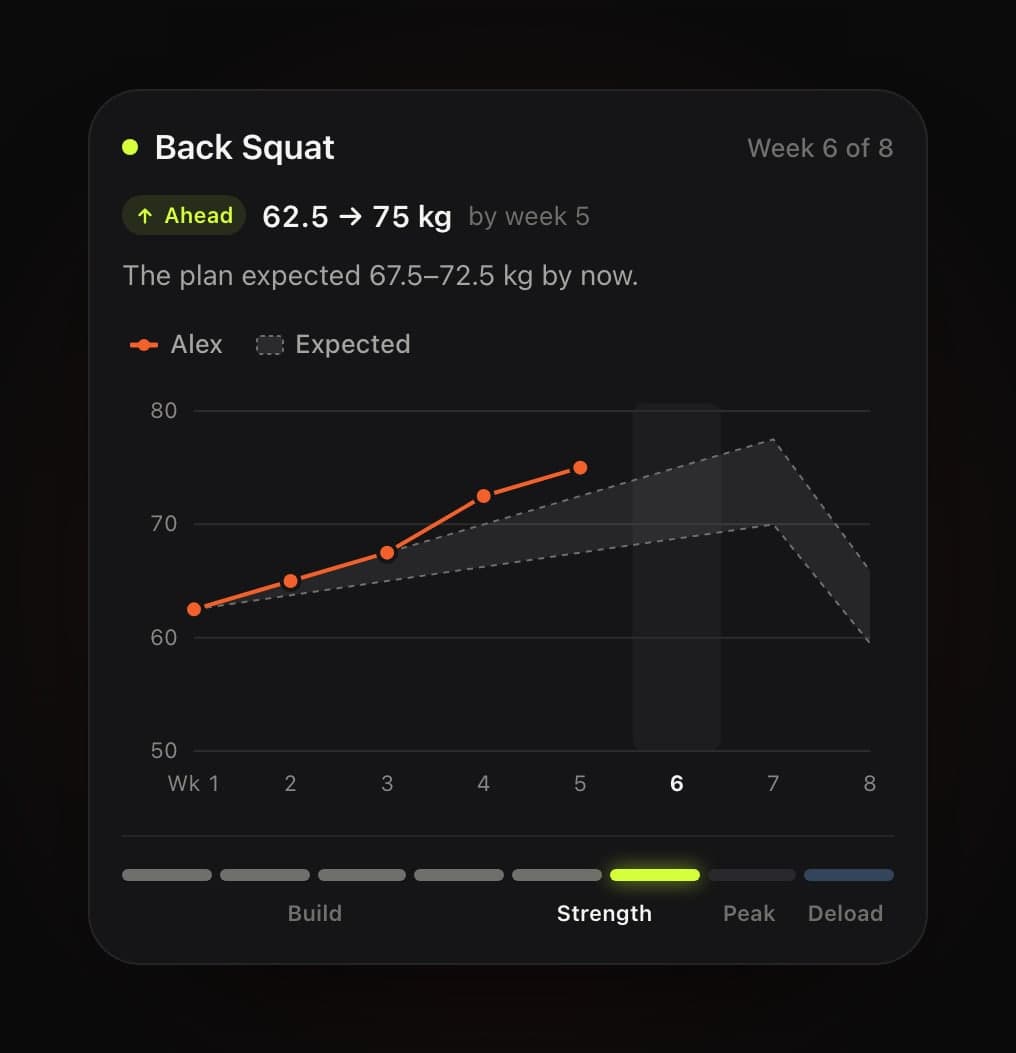
The weeks follow an eight-week block. There are four weeks of 3×5 to build, two of 4×4 for strength, one of heavy triples to peak, and a deload week of two sets about 15% lighter. Then the next block starts from wherever you got to.
Spotter works the plan out afresh from what's been logged, so if you fix a mistake in your history, the plan fixes itself.
One app, two phones
Spotter is a web app you add to your home screen. It opens full screen, it has its own icon, and it keeps working without signal. That's how it covers an iPhone and an Android phone, with no app store in between.
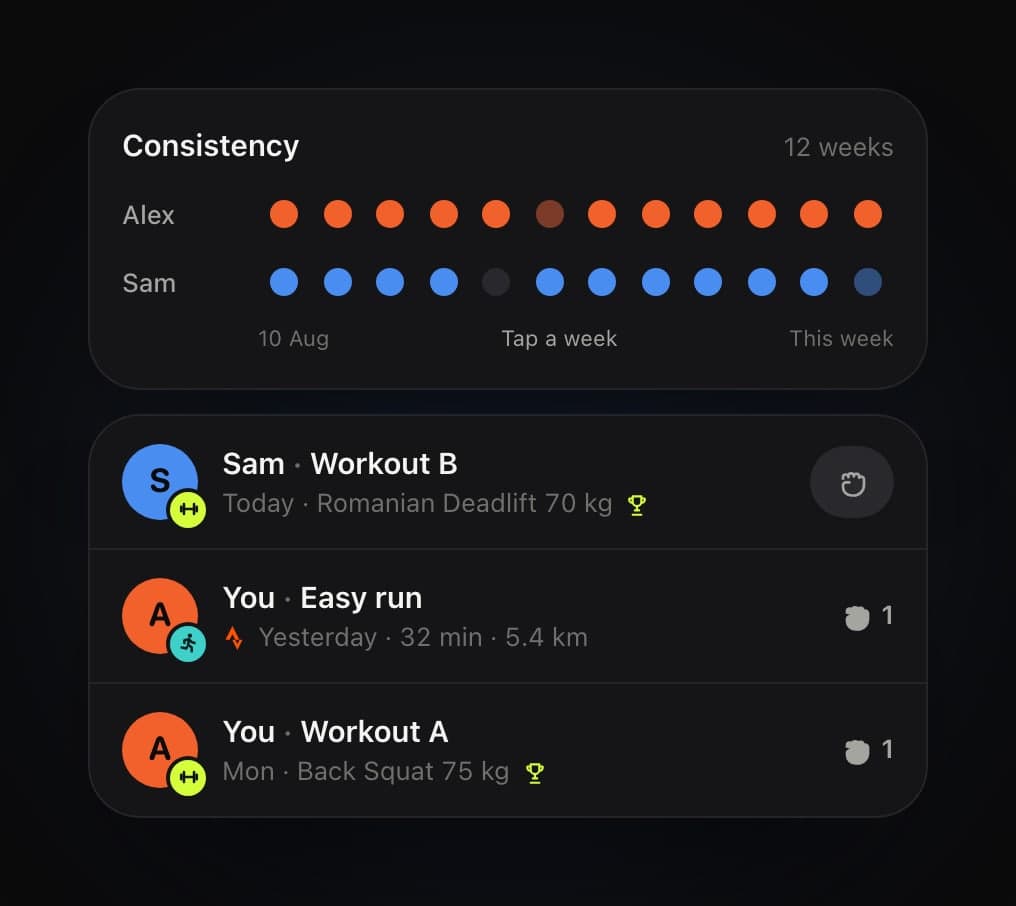
It's just for the two of us. There's no sign-up, only a crew code: one of us sends the other a link, or just tells them the code. We can log a session for both of us in one go, follow each other's weeks, and fist-bump the good ones. There are no followers, no strangers and no leaderboard.
The next day
That first night, I sent it to my friend. He isn't technical, and by Wednesday afternoon he'd come back with notes and a new programme. The big lifts stayed on their own, the smaller exercises went into supersets, and each part had its own rest time. I passed it all on, and asked for it to be handled the way a head of product would: keep the bar where it was, or raise it.
By that evening, Spotter had:
- his programme, with supersets, and reps in the tank after each lift;
- a colour for each kind of exercise: main lifts, accessories and core;
- a chart of what the plan expected against what we actually lifted;
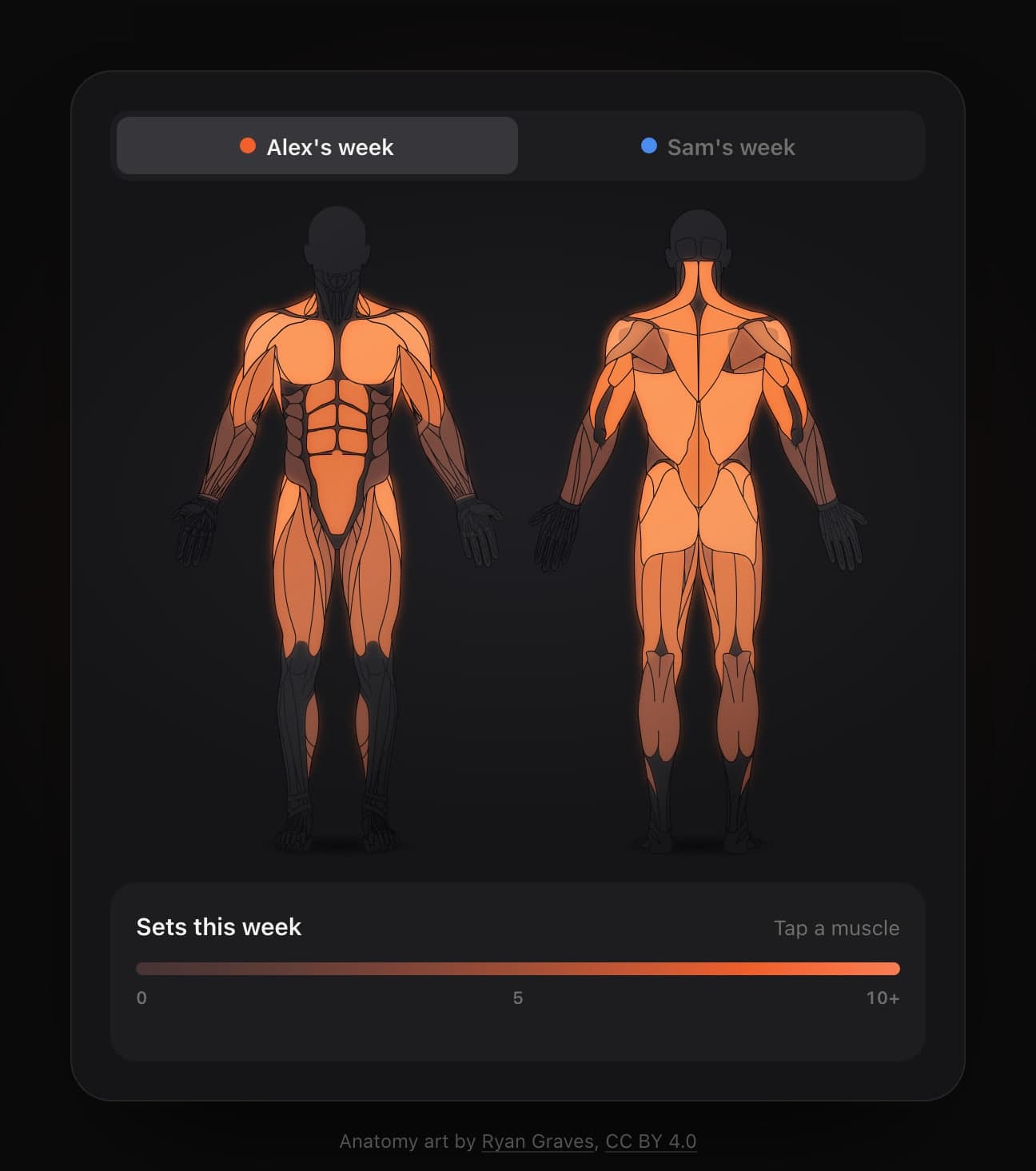
- a body map of the muscles each session trained, and how much over the week;
- a weekly schedule of lifting, running and rest days, with easy Zone 2 runs that go by the talk test: if you can't chat, slow down;
- runs that log themselves from Strava;
- a weekly weigh-in that only you can see, with how much protein to aim for at your weight;
- and a tidy-up, so everything added that day had an obvious place.
The body map was the one I pushed hardest on. Brighter means more sets, up to about ten a week, which is roughly where muscles grow most. Tap a muscle and it shows which lifts hit it.
The landing page
On Thursday morning I asked for a new landing page. I didn't want screenshots of the app. I wanted its most interesting parts, picked out. Thirty-seven minutes later it was live. Every section is a working piece of the app, built from its real parts and following its real rules, played by two made-up people, Alex and Sam. Log a squat and it tells you next time's weight. Tap a week on the chart for its numbers. Give Sam a fist bump.
That's where every picture in this note comes from.
The numbers
- 35 minutes from my first message to a live app, with that night's session in it.
- 75 minutes to its own domain.
- 30 messages from me over three days.
- 15 commits and about 14,000 lines of code.
- 100 tests on the parts that do the thinking: the plan, the warm-ups, the body map, the week and the Strava sync.
- $9.99 for the domain's first year, then $15 a year.
What I learned
Software doesn't need a market any more. Software has been built for markets because building it was expensive: it only made sense if thousands of people wanted the same thing. Spotter has two users, and that's fine. When building costs an evening, software can be made for a household, a team or two friends, and fit them exactly instead of roughly.
What's left to pay for is what can't be built in an evening. A lot of apps are a set of features wrapped in a business: sign-ups, subscriptions, upsells, ads. The features are getting cheap to make. What still holds its value is what's hard to copy: the network, the data, the trust. Spotter leans on one of those itself: its runs come from Strava.
The scarce part is knowing what good looks like. The code was the quick part. The time went on deciding what it should do, what to leave out, and noticing what felt wrong at the gym. That's product judgement, and it matters more now, not less.
What's real and what isn't
Every picture here is a screenshot or a screen recording of Spotter's public landing page, spotterlifts.app. The demos on it are built from the app's own parts and follow its rules, but the two people, Alex and Sam, and all their numbers, are made up. None of our real training is in this note.
Spotter is invite only, so you can't sign up. It's for the two of us.
My first message was dictated, and the quote from it is edited and shortened. The times come from the chat and the commit history.
Credits
The anatomy art is by Ryan Graves, under CC BY 4.0. Runs come from Strava. Built in conversation with Claude Opus 5.5 in T3 Code, on React, Vite, Convex and Vercel.
Thanks for reading.
Back to all notesI led the work, and AI helped along the way. Badge by AI Honesty Badge.